Create a Repurposing Content Workflow—Best Hacks for Your Author Business
You can do anything, but not everything.” – David Allen, Getting Things Done
Repurposing content sounds simple in theory.
You take something you have already written, such as a book chapter, blog post, checklist, newsletter, or workshop, and transform it into a new format that can serve your readers in another way.
The problem is not usually the idea. The problem is the process of repurposing content.
Many indie authors repurpose content inconsistently. They may have a book full of useful ideas, a folder of old blog posts, or a growing collection of AI-assisted drafts, yet still find themselves asking:
- Where do I begin?
- Which piece should I repurpose first?
- What format should it become?
- How do I avoid duplicating something I already created?
- When should I use AI?
- How do I keep my voice?
- How do I make sure the finished piece connects with the rest of my content?
Without a workflow, every repurposing project feels like a new decision tree. That wastes time, creates confusion, and makes it harder to build a consistent author platform.
A simple repurposing content workflow helps you decide what to do next and what not to do right now.
The goal is to create a repeatable process you can actually maintain.
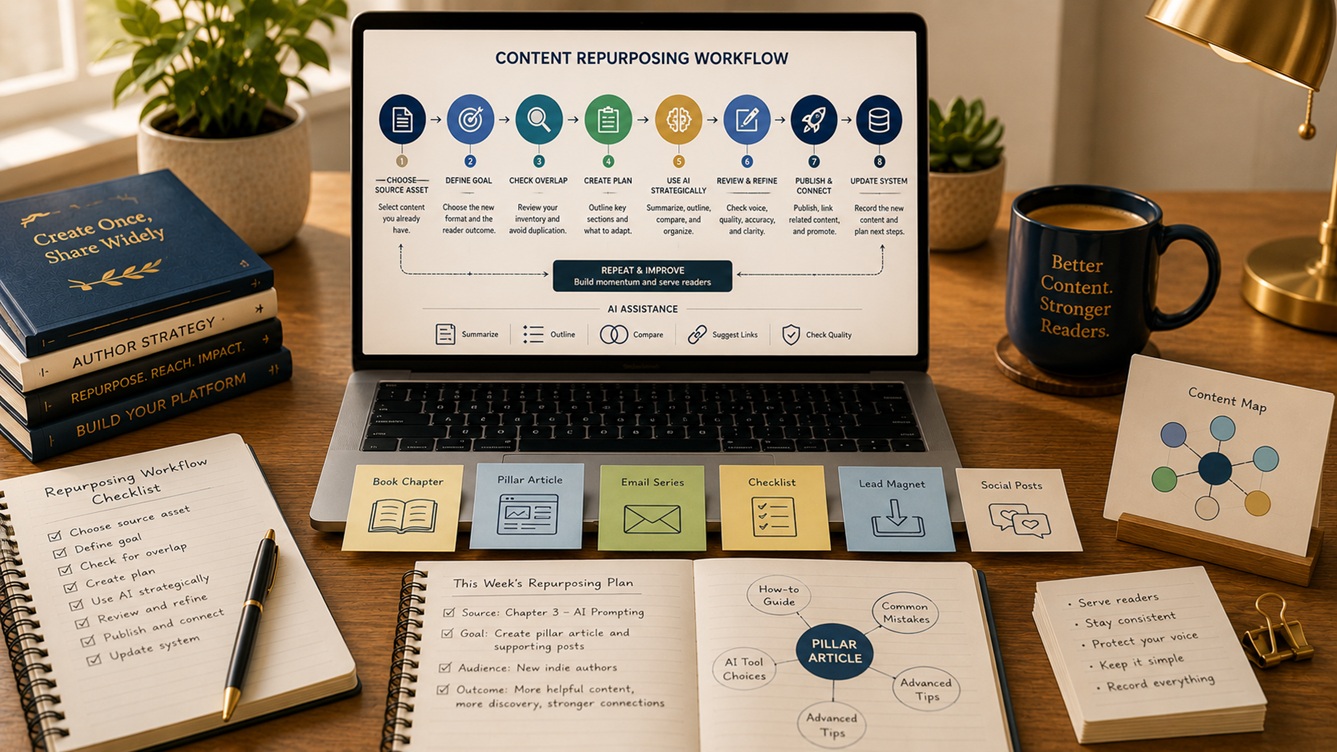
The following seven-step workflow will help you turn repurposing into a practical habit in your author business.
What Is a Repurposing Content Workflow?
A repurposing workflow is a repeatable sequence of actions you follow when turning existing content into a new asset.
For an indie author, that workflow might begin with:
- a book chapter
- a blog article
- a newsletter
- a reader question
- a checklist
- a workshop outline
- a podcast script
- a video transcript
- a collection of notes
And it might produce:
- a pillar article
- a supporting post
- a checklist
- a template
- a reader magnet
- a book chapter
- a social series
- a short video topic
- a newsletter
- a webinar segment
The workflow guides you from source content to finished output.
It also helps you:
- avoid duplicate work
- make better use of AI
- preserve your voice
- maintain a content map
- connect one piece with another
- create a more sustainable publishing rhythm
Why Authors Need a Workflow
A workflow reduces friction. When you know the next step, you spend less time wondering what to do and more time completing the work.
Without a workflow, authors often:
- jump into drafting too soon
- repurpose the wrong content
- create overlapping pieces
- forget to update their content records
- publish disconnected resources
- skip quality review
- lose time deciding the same things repeatedly
A workflow also helps you make repurposing part of your business rather than an occasional rescue strategy for slow publishing weeks.
That matters because repurposing is not just a shortcut. It is a way of managing and extending your intellectual property.
Keep the Workflow Simple
The best workflow is not the most impressive one. It is the one you will actually use.
If your repurposing system depends on:
- ten dashboards
- color-coded automation you do not understand
- a complicated project-management app
- a perfectly organized content archive
- several hours of setup every time you repurpose a piece
then the workflow may become another unfinished project.
A simple workflow should help you answer:
- What is my source material?
- What do I want it to become?
- Who is the new piece for?
- What needs to change?
- How can AI help?
- What quality checks are required?
- Where does the finished piece fit?
That is enough to create a practical, repeatable system.
Step 1: Choose One Source Asset
Every repurposing workflow begins with one clear source asset.
Choose something substantial enough to support a new piece, such as:
- a book chapter
- a blog post
- a newsletter series
- a workshop outline
- a checklist
- a podcast script
- a long-form note or teaching document
Do not begin with a vague idea such as: I should repurpose some old content.
That does not give the workflow anything specific to process.
Instead, identify:
- the source title
- the content type
- the main topic
- the intended reader
- the current location
- the original purpose
- the source of truth
For example:
Source asset: Chapter 4 of my nonfiction book on AI prompting
Purpose: Turn it into one pillar article and several supporting posts
Or:
Source asset: Website article about book descriptions
Purpose: Turn it into a checklist and newsletter sequence
The clearer the source, the easier every other step becomes.
Example AI Prompt
Act as a content-planning assistant for an indie author. Review the following source asset summary and identify its main topic, intended reader, core promise, major subtopics, and possible repurposing potential. Do not suggest final outputs yet. First, summarize the source clearly.
This keeps the workflow grounded in what the source actually contains.
Step 2: Define the Repurposing Goal
Next, decide what the source asset should become.
This is one of the most important steps, because the workflow changes depending on the destination. A blog article becoming a book chapter requires a different approach from a chapter becoming a checklist.
Ask:
- What format am I creating?
- Who is it for?
- What problem will it solve?
- Why is this the right next output?
- How is it different from the original?
- How does it support my content strategy?
Examples:
- turn a book chapter into a pillar article
- turn a long article into a checklist
- turn three related articles into one chapter
- turn a chapter into an email series
- turn a newsletter into a downloadable guide
Avoid vague goals such as: Make more content from this.
The repurposing goal should be concrete.
Use the One-Output Rule
When building a simple workflow, choose one primary output at a time. You may eventually create a whole cluster of assets, but the workflow should start with one clear target.
That keeps the process focused and manageable.
Step 3: Check for Existing Versions and Overlap
Before you start adapting the source material, confirm whether the intended output already exists in whole or in part.
Review your:
- content inventory
- repurposing map
- website archives
- book files
- drafts
- newsletters
- checklists
- AI conversations
- notes and project records
Ask:
- Have I already created something similar?
- Does the topic already exist under another title?
- Would the new piece substantially overlap an existing one?
- Which version is the source of truth?
- Should I update or expand an existing piece instead?
This step protects you from unnecessary duplication. It also helps the workflow stay connected to the larger content system instead of producing isolated new pieces.
Example AI Prompt
Compare this proposed repurposing output with my current content list. Identify exact duplication, strong thematic overlap, partial overlap, and no significant overlap. Explain the evidence for each conclusion. Do not assume that different titles mean different content.
Step 4: Create a Development Plan
Once the source and goal are clear, build a simple development plan.
This does not need to be elaborate.
A practical development plan can include:
- source asset
- intended output
- intended reader
- reader problem
- reader promise
- key sections or steps
- source material to preserve
- new material needed
- format-specific adjustments
- internal links or related content
- checklist or FAQ
- call to action
- facts requiring verification
For example, if you are turning a chapter into a pillar article, the plan may include:
- overview introduction
- main stages of the process
- definitions
- supporting examples
- internal links to supporting posts
- revised conclusion for web readers
The development plan turns the workflow from a vague intention into a usable blueprint.
Example AI Prompt
Using the following source asset and repurposing goal, create a simple development plan. Include the intended reader, reader promise, major sections, supporting material, likely gaps, and the new material required. Keep the plan practical for one indie author.
Step 5: Use AI for the Right Parts of the Process
AI is most useful when it supports the workflow rather than trying to replace it.
Good uses of AI in a repurposing workflow include:
- summarizing source material
- identifying subtopics
- comparing content for overlap
- suggesting outlines
- organizing supporting questions
- detecting gaps
- drafting first-pass structures
- checking for repetition
- helping generate internal-link suggestions
- comparing several versions of a piece
Less helpful uses include:
- asking AI to repurpose a large source without a clear goal
- letting AI invent examples or experiences
- accepting structure suggestions without review
- using AI output without a voice pass
- turning over final judgment to AI
A simple workflow should include clear points where AI helps and points where you take over.
A Practical Division of Labor
AI can help with:
- analysis
- organization
- outlining
- comparison
- first-pass drafting support
You should remain responsible for:
- strategic direction
- reader fit
- voice
- examples
- factual accuracy
- final quality decisions
- publishing judgment
Step 6: Review for Voice, Quality, and Reader Value
Before publishing or saving the new piece, review it carefully. Repurposed content often needs more than a grammar check.
Ask:
- Does the new piece solve a clear problem?
- Does it stand on its own?
- Is the reader promise clear?
- Does it fit the intended format?
- Does it sound like me?
- Has the material been adapted rather than merely copied?
- Are the examples useful?
- Is any information outdated?
- Does it overlap too heavily with another piece?
- Does it need stronger transitions or structure?
This is the stage where repurposing becomes editorial work rather than just content movement.
Example AI Prompt
Evaluate the following repurposed content draft for reader clarity, structure, overlap risk, missing context, unnecessary repetition, and voice consistency. Provide a report with recommendations, but do not rewrite the piece yet.
Then complete your own human review before finalizing the draft.
Step 7: Publish, Connect, and Update the System
The workflow is not complete when the draft is finished.
You also need to connect the new piece to the rest of your content ecosystem.
That may include:
- publishing the article
- uploading the checklist
- adding internal links
- linking from the pillar piece
- updating the content map
- recording the new format
- marking the source relationship
- noting the final URL or file location
- identifying future repurposing opportunities
This final step is what makes the workflow sustainable. Without it, you will keep creating content without preserving the history of how it connects.
Example Post-Workflow Record
| Source | Output | Relationship | Status | Location |
| Book Chapter 4 | Pillar article | Adapted from chapter | Published | URL |
| Book Chapter 4 | Checklist | Extracted from chapter | Drafted | File folder |
| Article on prompt mistakes | Email sequence | Expanded from article | Planned | Email folder |
This record becomes part of your larger author content system.
A Sample Simple Repurposing Workflow
Here is one practical version you can adapt:
1. Select the source
Choose one article, chapter, or other content asset.
2. Define the destination
Choose one new format and one reader outcome.
3. Check the map
Review your content inventory and repurposing map for overlap and existing versions.
4. Plan the adaptation
Create a short development outline.
5. Use AI strategically
Ask AI to summarize, compare, outline, or organize.
6. Draft and revise
Adapt the material for the new format and intended reader.
7. Review quality
Check voice, accuracy, value, and repetition.
8. Publish and connect
Add links, CTAs, and related resources.
9. Update the records
Add the new piece to your repurposing map and record the relationship. This simple sequence can become the standard process you use again and again.
Where This Workflow Fits in Your Author Business
A repurposing workflow does not have to operate as a separate content department. It can be integrated into your normal publishing rhythm.
For example:
Weekly Workflow
- review the content map
- select one repurposing opportunity
- create one new output
Monthly Workflow
- choose one source asset
- build one content cluster
- update the repurposing map
- identify next month’s source material
Project-Based Workflow
- use the workflow when launching a book
- use it when developing a new blog series
- use it when turning course material into written content
- use it when refreshing older content
The right rhythm depends on your publishing schedule, energy, and priorities.
The workflow should support your business not overwhelm it.
Common Workflow Mistakes
A repurposing workflow becomes harder to maintain when authors:
- try to repurpose everything at once
- begin drafting before defining the goal
- skip the overlap check
- use AI without a development plan
- fail to adapt content for the new format
- neglect voice review
- forget to update their records
- create outputs without linking them to related content
A simple system works best when it reduces decisions, not when it creates new confusion.
Final Thoughts
Repurposing becomes much easier when it moves from occasional improvisation to a repeatable workflow.
Begin with one clear source asset. Define one repurposing goal. Check for overlap. Create a development plan. Use AI to support analysis and organization. Review the finished piece for quality and voice. Then publish it, connect it, and update your content system.
That process may sound simple, but that is precisely the point. A useful workflow should help you take action consistently without rebuilding the process every time. You do not need a complicated system to repurpose content well.
You need a clear one.
Simple Repurposing Workflow Checklist
Choose the Source
- Identify one source asset.
- Record the content type and title.
- Identify the main topic.
- Identify the intended reader.
- Confirm the original purpose.
- Record the current location.
- Identify the source of truth.
Define the Goal
- Choose one output format.
- Define the intended reader.
- Write the reader problem.
- Write the reader promise.
- Explain why this is the right repurposing goal.
- Confirm how it differs from the source.
Check for Overlap
- Review the content inventory.
- Check the repurposing map.
- Look for similar existing pieces.
- Identify possible duplication.
- Confirm whether an update or expansion would work better.
- Identify the strongest source version.
Create the Plan
- Outline the major sections.
- Identify the material to preserve.
- Note what needs rewriting.
- Identify new material required.
- Plan internal links and related resources.
- Choose whether to add a checklist or FAQ.
- Note facts that require verification.
Use AI Strategically
- Ask AI to summarize the source.
- Use AI to compare related content.
- Use AI to help outline the new piece.
- Use AI to identify repetition or gaps.
- Do not allow AI to invent personal experience or unsupported facts.
Review the Draft
- Confirm that the piece stands alone.
- Check the reader promise.
- Check structure and clarity.
- Review for voice consistency.
- Review for outdated information.
- Remove unnecessary repetition.
- Confirm the piece offers distinct value.
Publish and Update the System
- Publish or save the final output.
- Add internal links.
- Connect related resources.
- Record the source-output relationship.
- Update the content repurposing map.
- Note future repurposing possibilities.
For more guidance, see our other writer’s guides in this series. We suggest starting with the first one, Turn Blog Posts into a Book with AI: 8 Best Hacks.
We hope you’ve found the writer’s guide strategies useful and motivating. We hope they’ll equip you with the insights and tools needed to help you succeed as a new author.
You might also enjoy our books: Book Description Optimization: A Step-by-Step System to Clarity, Discoverability, and Reader Trust OR Write Smarter, Stay Human: Use AI Without Losing Your Voice, Values, or Vision.
Writing is a journey of continuous learning and improvement. You don’t have to go it alone. We’re excited to continue the journey with you, providing guidance and encouragement every step of the way. Our goal is to provide essential insights and practical advice to help you navigate the writing world with increased confidence.
If you have a draft you want to publish and are wondering how AI can help, read Is Your Book Ready to Self-Publish?
Don’t wait. Start today!
How can we help? To let us know, please fill out our Contact form.
Happy writing!